
Accessibility Options:
subjectId: 690882
visibleTabCount: 7
-69aef61a009d2268927328_medium.png)
Welcome from UM Libraries
This guide will serve as a resource to help you navigate the Miami Project for your FYD 101 course assignment.
How to Access the Library Website
Library Website Overview
uSearch
This section will discuss ways to search using uSearch for materials using a combination of Boolean Operators in order to generate effective results.
How to Search using uSearch
Library databases and search engines, such as uSearch, are different from a search engines like Google, where you can type in a sentence such as "why is the sky blue?" and it yields results that can answer your question. uSearch and library databases differ because it doesn't allow sentence searching. You will have improved success in searching uSearch and databases by using a mix of keywords and Boolean Operators.
-6877c67b3b79f485781160_large.jpg)
Searching for a Phrase
To search for a phrase, type quotation marks around the phrase. You can combine both words and phrases in your search.

If you do not use the exact phrase options, the system will find items that contain the individual words in the phrase, regardless of whether these words are located next to each other in the order specified.
Excluding Words or Phrases
You can exclude items that contain specific words or phrases. To do so, type NOT (in all capitals) and then type the word or phrase to exclude.
For example, to search for items with the word Celtic and exclude any of these items with the word Irish, type the following in the search box:
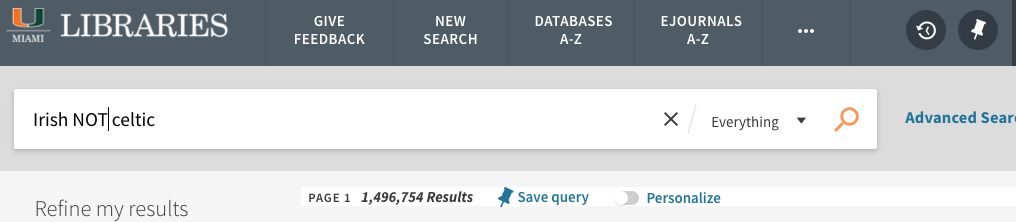
If you search for words or phrases without specifying OR or NOT, Primo assumes that you are searching for all the specified words or phrases.
Grouping Terms Within a Query
You can use parentheses to group terms within a query. For example, to search for Shakespeare and either tragedy or sonnet, type the following in the search box:
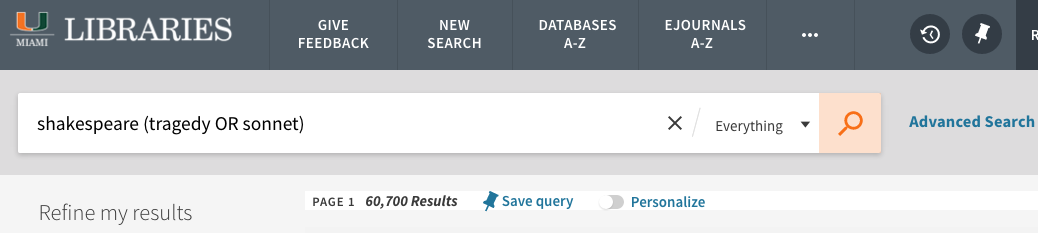
Searching for Any Specified Words or Phrases
You can search for items that contain at least one of the words or phrases you type in the Search box. To do so, type OR (in all capitals) between the words or phrases.
For example, to search for items with the word Irish or the word Celtic, type the following in the search box:
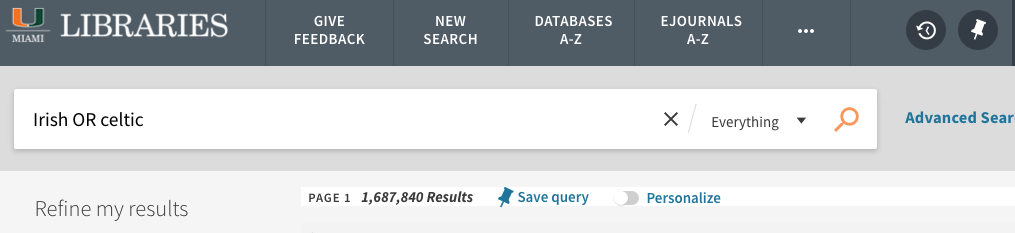
If you search for words or phrases without specifying OR or NOT, uSearch assumes that you are searching for all the specified words or phrases.
Searching Using Wildcard Characters
You can include the following wildcard characters in your searches:
? - enter a question mark to perform a single character wildcard search. For example, type wom?n to search for records that contain the strings woman, women, and so forth.
* - enter and asterisk to perform a multiple character wildcard search. For example, type cultur* to search for records that contain strings, such as culture, cultural, and culturally.

The system ignores wildcard characters placed at the beginning of search terms. For example, the system treats the search terms ?aying and *aying as if you had searched foraying.
Expand Search Beyond UM
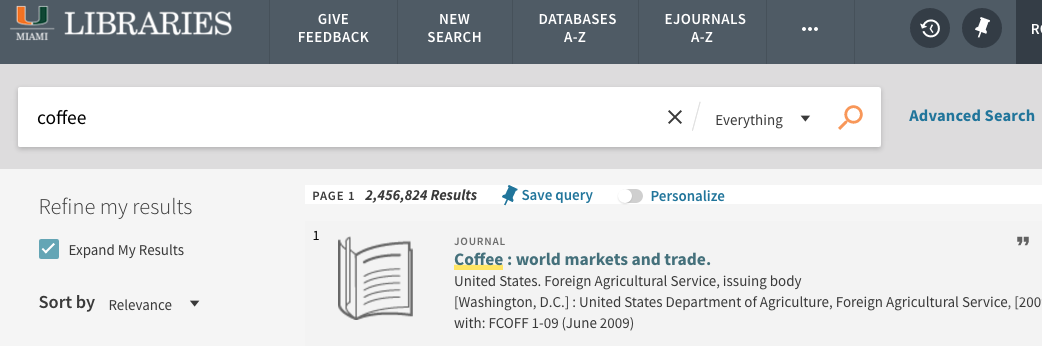
When doing a search in the Everything tab, you can click on the “expand beyond UM” limiter on the left after running a search. This link will expand your search results to materials that may be in another library. You can then order the materials through Interlibrary Loan.
uSearch Results
Boolean Operators Knowledge Check
Practice Creating a Search String
Library Databases
A database is a large collection of data organized for quick search and retrieval. At the UM Libraries, we allocate a significant portion of our budget to acquire databases for our online catalog. We house over 800 databases that include a variety of resources, such as print books, eBooks, movies, journals, magazines, newspapers, music scores, government documents, archives, special collections, and more!
You can search for specific subject areas and individual databases by using filters. There are two main types of databases you may encounter:
General Database: A general database is a good starting point for your research. For example, databases like Gale Academic OneFile cover a broad range of topics and subjects within a single platform.
Subject Database: A subject database, such as Engineering Village, is ideal for finding more specific information and resources related to a particular area of study. If your research topic is narrow, focused on a specific field, or highly technical, using subject databases can be especially beneficial.
How to Access Library Databases:
UM Special Collections Digital Collection
The Civil Rights Movement and the Black Experience in Miami
The selected images tell a story of struggle, community challenges, and hope for Black Miami in the 20th century. Through a combination of personal papers, books, professional photography, fliers and reports of civil rights activities this exhibition on Black Miami presents a sobering glimpse at what was and illustrates a path of civic involvement and pride.
Diaspora Vibe Cultural Arts Incubator records finding aid
Diaspora Vibe Cultural Arts Incubator was created to promote, nurture, and cultivate the visions and diverse talents of emerging artists from the Caribbean and the Latin American Diaspora through exhibitions, artists in residence programs, international exchanges, and education and outreach activities that celebrate Miami-Dade's rich cultural and social fabric.
Florida Culinary History Collection
Oral history interviews documenting the rich and diverse history of how food is cultivated, marketed, and consumed in Florida.
Climate Gentrification Oral History Collection
Oral history interviews with residents from neighborhoods in Miami on their experiences with the effects of climate gentrification in their communities.
Caribbean Diaspora Oral Histories
Oral history interviews with people of Caribbean ancestry who share stories of migration to the United States and the challenges inherent in such displacements.
Haitian Diaspora Oral Histories
Oral history interviews conducted with musicians, artists, and writers of Haitian ancestry.
Florida Photograph Collection
Photographs depicting Miami, Miami Beach, Coral Gables, Overtown, the Biltmore Hotel, the Everglades, and the 1926 hurricane.
South Florida Postcards
Postcards depicting South Florida scenes, including Miami, Miami Beach, Coconut Grove, and Coral Gables.
Historical Florida Brochures, Pamphlets, and Promotional Materials
Brochures, pamphlets, and other promotional materials related to tourism and development in Florida.
Types of Sources
This section focuses on the types of sources you may encounter in your research. Sources can be categorized in two different ways. "Types of Sources" may refer to:
- Level or distance from the original source of information (primary, secondary, or tertiary)
- Format of the information source (book, article, blog, etc.)
This section will clarify the differences.
Scholarly
Scholarly Sources can refer to peer-reviewed journal articles or academic books.
A scholarly publication is one in which the content is written by experts in a particular field of study - generally for the purpose of sharing original research or analyzing others' findings. Scholarly work will thoroughly cite all source materials used and is usually subject to "peer review" before publication. This means that independent experts in the field review, or "referee" the publication to check the accuracy and validity of its claims. The primary audience for this sort of work is fellow experts and students studying the field. As a result, the content is typically much more sophisticated and advanced than articles found in general magazines or professional/trade journals.
In brief, scholarly work is:
- Written by experts for experts
- Based on original research or intellectual inquiry
- Provides citations for all sources used
- It is usually peer-reviewed before publication
Peer Review in Three Minutes by NC State University Libraries
Popular
Popular sources include newspapers and magazines.
These aim to inform a wide array of readers about issues of interest and are much more informal in tone and scope. Examples include general news, business, and entertainment publications such as Time Magazine, Business Week, Vanity Fair.
Special interest publications that are not specifically written for an academic audience are also considered "popular," e.g., National Geographic, Scientific American, Psychology Today.
In brief, popular sources
- Journalists or professional writers write them for a general audience.
- Written in a language that is easy to understand by the general public.
- Rarely have a bibliography; rather, they are fact-checked through the publication's editorial process.
- Don't assume prior knowledge of a subject area - for this reason, they are often very helpful to read if you don't know a lot about your subject area yet.
- May contain an argument, opinion, or analysis of an issue.
Trade
Trade or Professional sources are generally for practitioners and people working in a particular field. These are more specialized than popular publications but are not intended to be scholarly. Rather, they communicated the news and trends in that field. Research findings are not typically disseminated here, though they may report that a scholarly publication is forthcoming.
These types of publications typically contain more advertising than a scholarly journal, though they're usually targeted to the field in some way.
Articles in trade publications, in most cases, are written by practitioners in a field (nurses, teachers, social workers, etc) and use the language (and jargon) of the field.
Example:
- College and Research Library News
- Construction Today
- Bar Journal
Primary Sources
Primary sources provide first-hand observations or direct evidence concerning a topic under investigation. Witnesses or recorders create them at or near the time of the event. They have not been filtered through further interpretation or evaluation.
Primary sources may include
- Original Documents: diaries, speeches, letters, interview transcripts, news footage, autobiographies, reports, census records, and data from an experiment
- Creative Works: poetry, plays, novels, music scores, films, paintings
- Objects: clothing, buildings, tools, furniture
Secondary Sources
Secondary sources are works that analyze, assess, or interpret a historical event, era, or phenomenon. They may use primary sources to write a review, critique, interpretation, or other work, often well after the event.
Secondary sources may include
- journal articles, editorial articles, literary criticism, book reviews, biographies, textbooks
Tertiary Sources
Tertiary Sources are those used to identify and locate primary and secondary sources.
Tertiary sources may include
- Reference Works: encyclopedias, abstracts
- Lists or Collections: bibliographies, finding aids
- Search Tools: library database or catalog, indexes
Primary vs. Secondary Sources
SIFT Method

SIFT Method
The SIFT method was created by Mike Caulfield. All SIFT information on this page is adapted from his materials with a CC BY 4.0 license. The SIFT Method is a four-step technique that can help to evaluate the credibility of online information.
Stop
The first step is to stop. When you encounter a webpage, an image, a social media post, etc., you first STOP. Ask yourself whether you know the website, source of the image or information, and what is the credibility of both the claim and the source. If you do not have that information, you can use the following moves to understand what it is you are looking at.
Pro tip: Do not share or read media until you know what it is.
Find Better Coverage
The third step is finding better coverage. If you found that the source's credibility is questionable, the quality is low, or investigating the source did not answer your questions, you may need to find better coverage. This move can mean searching elsewhere to assess the source's reliability or getting accurate information about the source or claim.
Ways that you can find better coverage are by:
- Reverse image searching
- Use fact-checking websites
- Search on Google or another search engine to see what coverage is available on that same topic
Investigate the Source
The next step would be to investigate the source. This step means that before you begin reading an article, website, or post, you want to know what you are going to read.
Say, for instance, you are about to read an article on the benefits of a vegan diet by a Save the Animals non-profit organization, you should be aware of that source. The same thing applies to a news article on inflation in the US economy, written by a Pulitzer Prize-winning economist and Harvard professor; you should know who the author is before you read the source.
Ways to investigate the source can look like:
- Use lateral reading. Go beyond the 'About Us' page and find what other trusted sources are saying about that source. You can search on Google or go Wikipedia to research the source.
- Hovering to learn more about who is sharing the information, especially on social media platforms.
Trace Claims, Quotes, and Media to the Original Content
The next step would be to trace claims, quotes, and media back to their sources. Online, much of the media we encounter is stripped of context. It could be for a variety of reasons: misleading reporting, edited sound and video, inaccurate captions or headlines, etc. As a result, these stories, videos, or claims can go through a game of telephone, and the more they go viral or circulate online, the more they can be distorted from their source or reporting. This is when you would investigate further and trace the media back to the source to find the original context.
Contact the FYE Librarian
-

Elida Velado Salazar
First-Year Experience Librarian
She/her/hers
305-284-6027
Have a Question? Ask a Librarian!
Academic Support
Schedule a one-on-one consultation to help you at any stage of your writing process.
Find expert support for digital audio, video, graphic design technology, and image creation techniques.
Access laptops, course materials, study spaces, and research materials at the Libraries and through Interlibrary Loan.
Want a Tour of the Library? Take our Scavenger Hunt!
-68794b78550ea794374350_small.png)
Website Resources
National Register of Historic Places
The National Register of Historic Places is the official list of the Nation's historic places worthy of preservation. Authorized by the National Historic Preservation Act of 1966, the National Park Service's National Register of Historic Places is part of a national program to coordinate and support public and private efforts to identify, evaluate, and protect America's historic and archeological resources.
Website list of art and cultural museums in Miami
Website with a list of historic districts in Miami. Miami's significant properties are snapshots of the past and visible reminders of the community's heritage. They also illustrate the growth and development of Miami, which began as a settlement of Native Americans and resilient pioneers and exploded into a city of distinctive style and cultural diversity.
 A Librarian